
Jupyter Notebooks are remarkably versatile tools, even within Microsoft Sentinel’s data lake where current capabilities are limited. While Microsoft frequently highlights historical threat intelligence correlation and long-term threat hunting as use cases, notebooks unlock far more practical possibilities.

In a previous post, I explored the theoretical foundations of using notebooks for advanced data pipelines in Microsoft Sentinel. This follow-up takes a different approach: focusing on practical solutions that solve problems I’ve encountered in production environments. Many of these scenarios were simply impossible to address using only traditional Sentinel SIEM capabilities.
The following scenarios should be seen as examples demonstrating the versatility of notebooks.
Use Case 1: Commitment Tier Optimization Through Backfilling
The Challenge
If your organization commits to a Commitment Tier, you’re charged the full fixed amount regardless of actual usage. Going over this limit will still create overage ingestion charges. During weekends, or off-business days, ingestion typically drops significantly. This unused headroom represents wasted money on a contractual commitment.
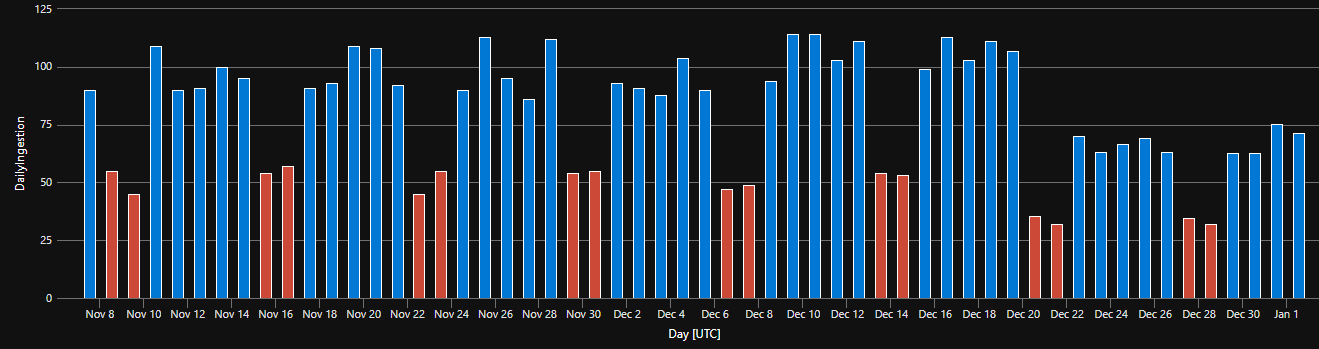 Typical ingestion pattern of a company during holidays
The opportunity: Use data lake to store raw data that can be processed outside peak hours, filling that commitment tier gap without increasing analytics ingestion costs. By strategically delaying lower-priority logs or summarizations until low-traffic windows, you shift expensive analytics tier costs to already-paid capacity. Effectively getting analytics tier storage for the cost of data lake ingestion.
Use cases:
- Logs from test or dev environments can be good to have in the SIEM, but they are frequently not needed by real-time detections, so their ingestion to analytics can be delayed.
- Inventorying data: Lists of machines, accounts, and vulnerabilities are frequently reintroduced based on a schedule (e.g., built-in IdentityInfo), and only changes are ingested constantly.
Workflow
Off-days processing workflow:
- During business days: Ingest high-priority security events to the analytics tier as normal (blue in the diagram) but keep less important logs in data lake (various colors in the image)
- Weekend/night processing: Schedule notebooks to run when the commitment tier is underutilized - promoting low-priority data and aggregations to the analytics tier as needed (stacked columns in the image)
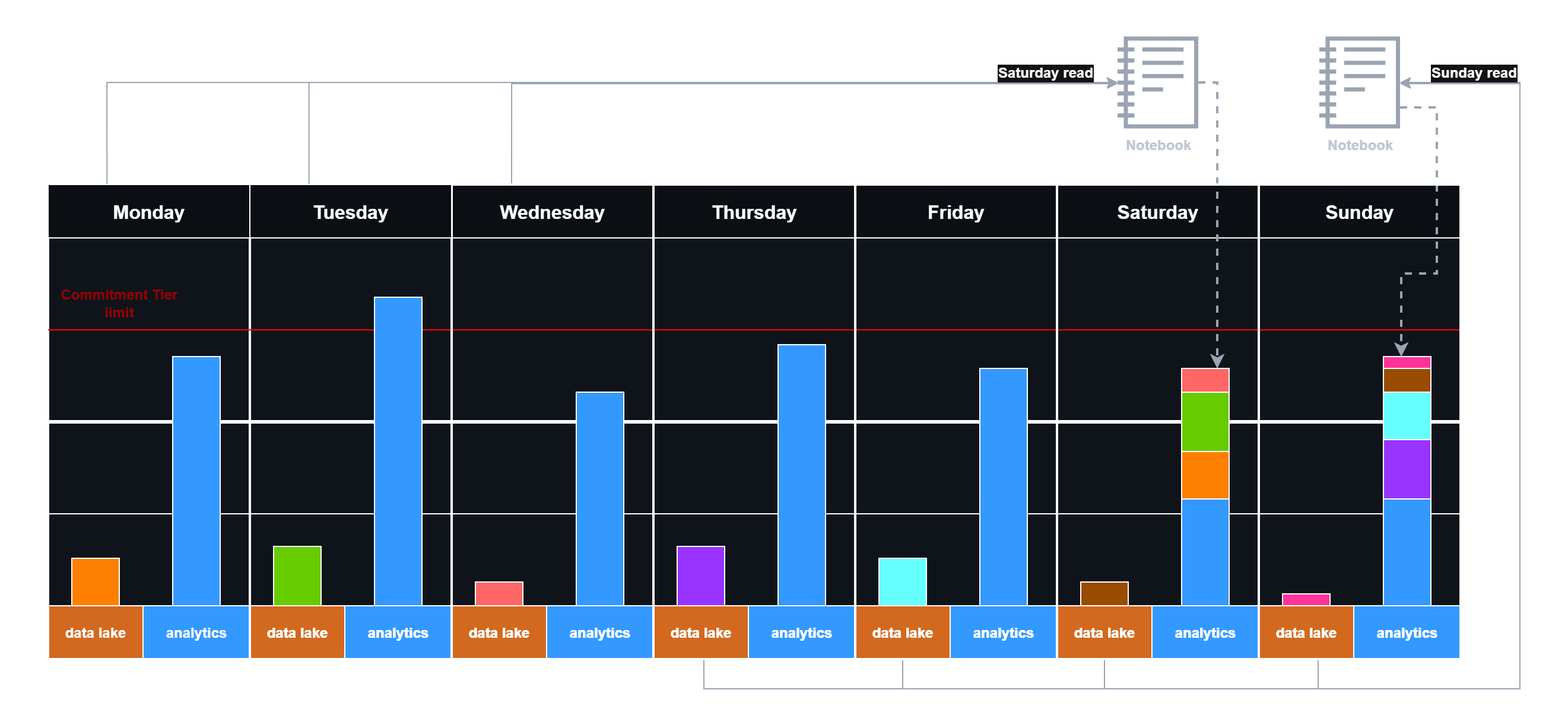 Delayed logging with weekend data reingestion
A potential inefficiency already appears in practice: Wednesday might have available commitment tier capacity, but logs don’t get pushed until the weekend because notebooks only check on weekends. You can accept this gap for simplicity, or create notebooks that process weekdays too - adding complexity but improving commitment tier utilization. The key takeaway is that commitment tier efficiency can be improved with the right strategy.
This approach trades off instant analytics ingestion for reduced ingestion costs. At the same time, it is important to consider the Advanced Data Insights costs generated by Notebooks.
UC 2: Advanced Log Splitting Across Multiple Sentinels
The Challenge
Organizations may use multiple Sentinel workspaces for various reasons, requiring logs to be split among them.
Data Collection Rules (DCRs) can split logs but they have limitations: DCRs handle each event individually and lack the context needed to route logs when the event data itself doesn’t specify the target workspace. Therefore, DCRs alone may not suffice in some cases.
The opportunity: In situations like this, one can create a staging Sentinel and use data lake tables to store the logs cheaply either as a source-of-truth (keep it here long-term) or as a temporary storage. Then process the logs via a Jupyter Notebook and forward them to their final destination. This can be done, because Notebooks can read and write logs into different connected Sentinel instances.
For example:
- User authentication logs that must be split based on department, team membership, or organizational hierarchy before pushing to workspaces - so, data needs to be looked up in other tables.
- Cloud platform activity that needs to be segregated by an assigned tag that is not available in the resource logs.
Workflow
Notebooks can perform intelligent log splitting based on data enriched from various workspaces and tables, then write results back to separate analytics tables or push to different Sentinel workspaces.
Log splitting workflow:
- Ingest all raw logs to the data lake (no filtering at ingestion time)
- Run a notebook that:
- Loads raw logs and enrichment data (user identity tables, organizational lookups, resource mappings)
- Joins logs with context (e.g., user’s department from IdentityInfo table)
- Filters and splits data as needed
- Writes results back to the target workspaces and tables
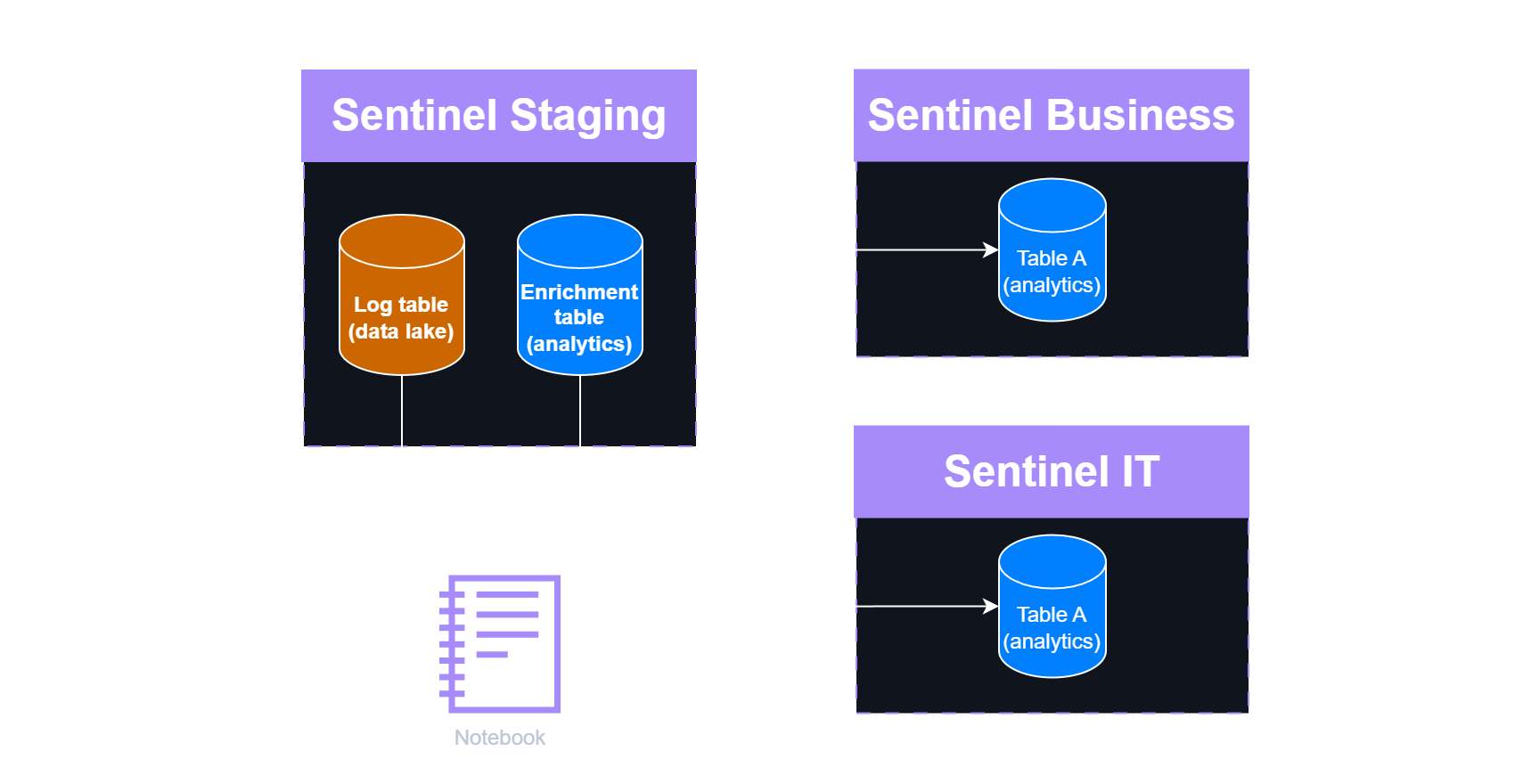 Advanced log splitting scenario
Considerations:
- In the Staging Sentinel environment, enrichment data is stored as an analytics table because it is accessed frequently.
- Consider storing the enrichment tables locally within each destination Sentinel instance, allowing each instance to maintain its own enrichment (identification) data.
- The Staging instance can also be used as temporary storage specifically for data lake–only tables.
UC 3: Behavioral and Stateful aggregation
The Challenge
Some log sources can generate tremendous numbers of logs, sometimes being unnecessarily redundant or detailed.
This is especially true for user actions on a GUI that is typically logged as multiple events for a single action. For example, a user going to a storage blob and opening a blob - that is 3 clicks on the GUI - results in around 10 different StorageBlobEvents. When a user clicks on a button on a webpage it can result in multiple POST events, redirects, and different file loads in the proxy logs.
Behavioral aggregation Instead of keeping all the raw logs, you could identify patterns in your environment. When you find a pattern, you can easily replace the underlying logs with an activity event. When there is no pattern match for an event, you can just ingest it as a raw log.
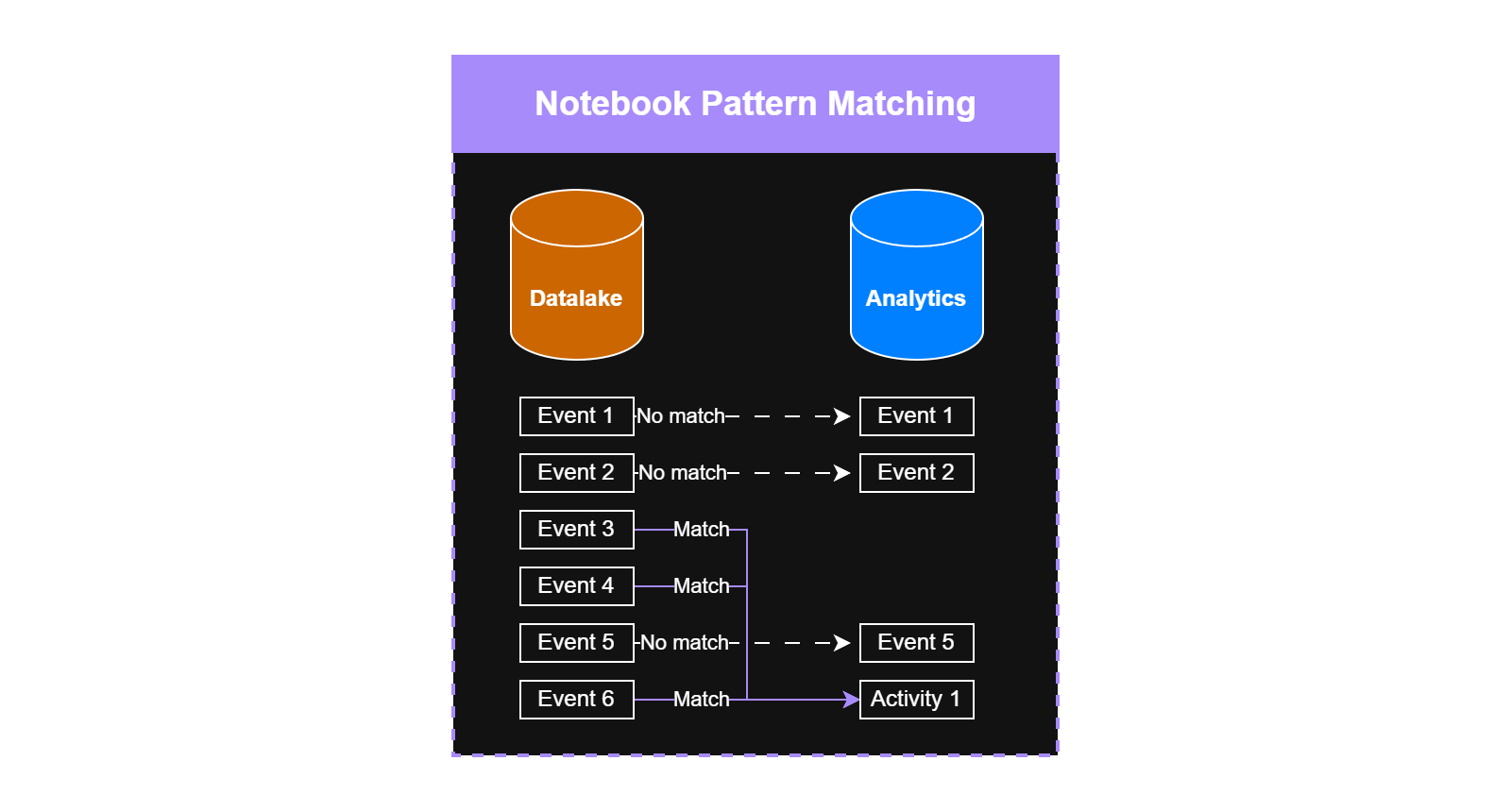 Pattern matching and aggregated logs
1. Firewall
For example, consider how firewall logs and network packets are related to each other.
- On the network layer, you have tons of packets during a TCP handshake, TLS build out, and the real communication. E.g. a successful TCP handshake consists of 3 packets.
- At the firewall level, all these packets are translated into a single or few ‘Connection started’, ‘Connection blocked’, ‘Teardown’, etc. logs. In case of a successful three-way handshake, it will be one ‘Connection built’ event.
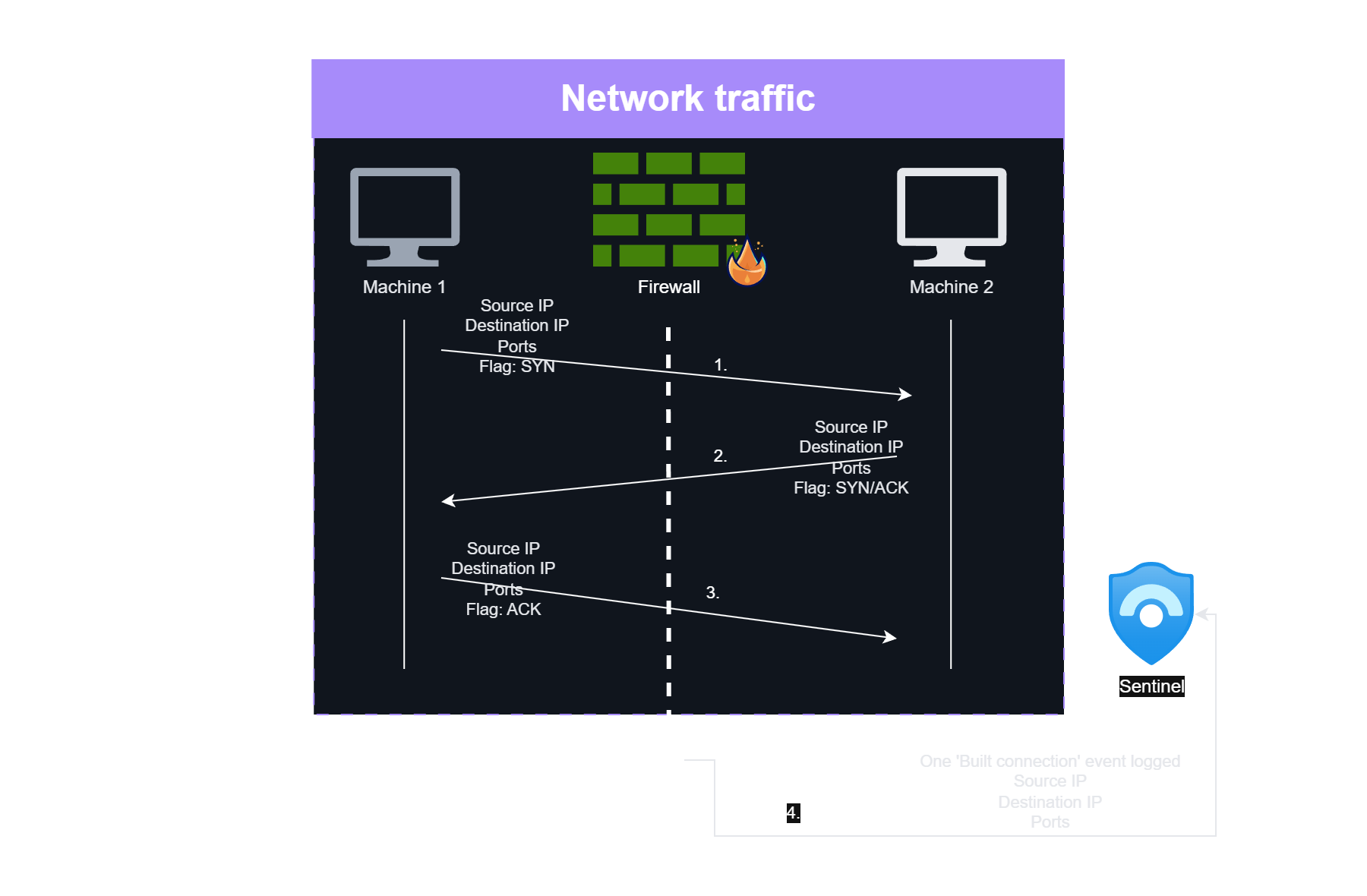 TCP handshake network traffic vs firewall logging
Having one firewall connection started and one teardown event with aggregated information (e.g., traffic size) is much more efficient than keeping all the packets as events in a SIEM individually. Firewalls are already providing aggregated views compared to single network packets.
2. Webserver
This principle applies across many domains. If you’re a webshop, checkout steps follow predictable patterns - going to the cart button, picking payment options, redirecting to the payment site - that are easy to recognize. So if you want to keep these logs, you can store the raw ones when there is no pattern match, and replace the matches with a single aggregated event. Similar to how firewall logs the traffic.
Patterns like this can be really environment-specific in some cases - for example, the checkout pattern is related to a specific webshop - while other patterns can be general across multiple environments
3. Proxy
Similarly, just like firewalls do, you can create aggregations for proxy logs. When a user visits a specific site, log only a ‘first visited’ event; this is sufficient for threat intelligence correlations. At the end of the session, log a ‘session end’ event containing all visited URIs, summarized traffic size, etc. This removes duplicate information and allows significantly lower ingestion costs.
Since Jupyter Notebooks make it easy to analyze historical data over longer time periods, you can even dynamically whitelist URLs based on typical user browsing behavior according to your risk appetite. This approach balances cost reduction with security visibility by learning what’s normal for your organization.
While this can be a good cost-saving and performance-enhancing measure, it requires careful planning and reliable logic. All teams using the data need to be aware of these changes and understand how the aggregations affect their use cases.
Summary
This is not the first time I’ve highlighted that Jupyter Notebooks offer far more value than threat hunting or TI matching tools for your Sentinel data lake.
The use cases I’ve described are real scenarios I’ve implemented in Sentinel data lake environments. After considering these possibilities, I strongly encourage you to be creative with the toolkit that data lake provides for your SIEM - the potential for cost optimization, data quality improvement, and operational efficiency is substantial.