
MCP servers are now the default way to connect AI to real systems, tools and data. In SOC scenarios, they are used to pull logs, run hunts, and automate response steps. It feels clean and simple: you ask the model, it calls the tool, you get what you were looking for.
Reality is messier. MCP servers are optimized for access, not guardrails, and controls are rarely available by default. The result is that a single vague natural language request can turn into an expensive and problematic execution.
I spend a lot of time in Sentinel data lake. I use the official MCP server myself, and I have watched enterprises adopt it as well. I have also seen the dark side: A single vague prompt cost my client 450$. One query. No malicious intent - just an LLM doing exactly what it was asked without the guardrails we take for granted in the Azure/Defender portals.
This post walks through a practical example and a minimal patch that makes the Sentinel MCP server safer. I am not trying to replace the official server. I am showing a PoC example of how to wrap it, add guidance for the model, and enforce a couple of simple rules so you avoid accidental full scans.
Data Lake Realities
Cost Elements
When using an MCP server, multiple cost elements come into play. The most relevant for our use case is the cost of the end system incurred by calling specific tools - in this example, querying data in Sentinel data lake via the query_lake tool.
Data lake queries via MCP are billed at 0.005 USD/GB (East US) of scanned data. That sounds tiny until you scale it. Most new orgs ingest way more data into the lake than they used to keep in Sentinel in the past. So the data is cheaper, but there is much more of it. There is overall more data to be used in most environments.
A quick example: A customer ingesting 1 TB of data daily into the lake, running queries with a 90-day lookback, scans approximately 90 TB per query - for roughly $450. This is acceptable for deliberate, infrequent analysis but painful if triggered by accident.
The Root of The Problem
In the Azure Sentinel portal and in Defender Advanced Hunting, a default lookback time exists. If you do not specify a time range via the TimeGenerated filter in the query, the UI uses the default ‘Last 24 hours’ setting. The MCP server does not enforce the same default. If a query is missing a TimeGenerated filter, it scans the entire table.
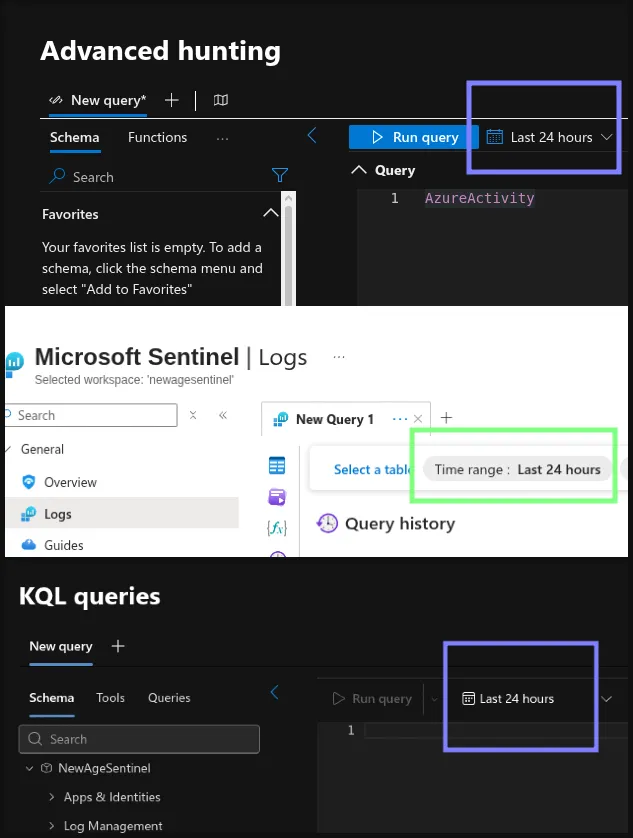 Default lookback window of 24 hours in various tools.
These unlimited query runs are more frequent than people think. The reasons? :
- Users are used to the 24h default coming from other pages/experiences.
- Legacy SIEM users are used to free queries - filter optimization was optional.
- LLMs interpret vague prompts broadly and in a non-deterministic way - which can cause unrealiability.
Without a guardrail, a simple vague prompt can turn into an expensive full database scan.
The Risk Scenario: Vague Prompts Trigger Full Scans
When you ask an LLM to “pull recent sign-in activity,” you might think you are safe. But the model can easily produce a query without a TimeGenerated clause. When that query runs via MCP, it scans everything it can reach.
This isn’t just theory. When I asked OpenCode (GPT-4.1) to retrieve timestamps for the last 10 Azure Activity events from my data lake, it complied exactly. But my vague prompt led to a query without a TimeGenerated filter. Without safeguards, that vagueness could rack up massive costs.
Even precise queries with clear specifications can still trip up LLMs. So, this article is not just about human error.
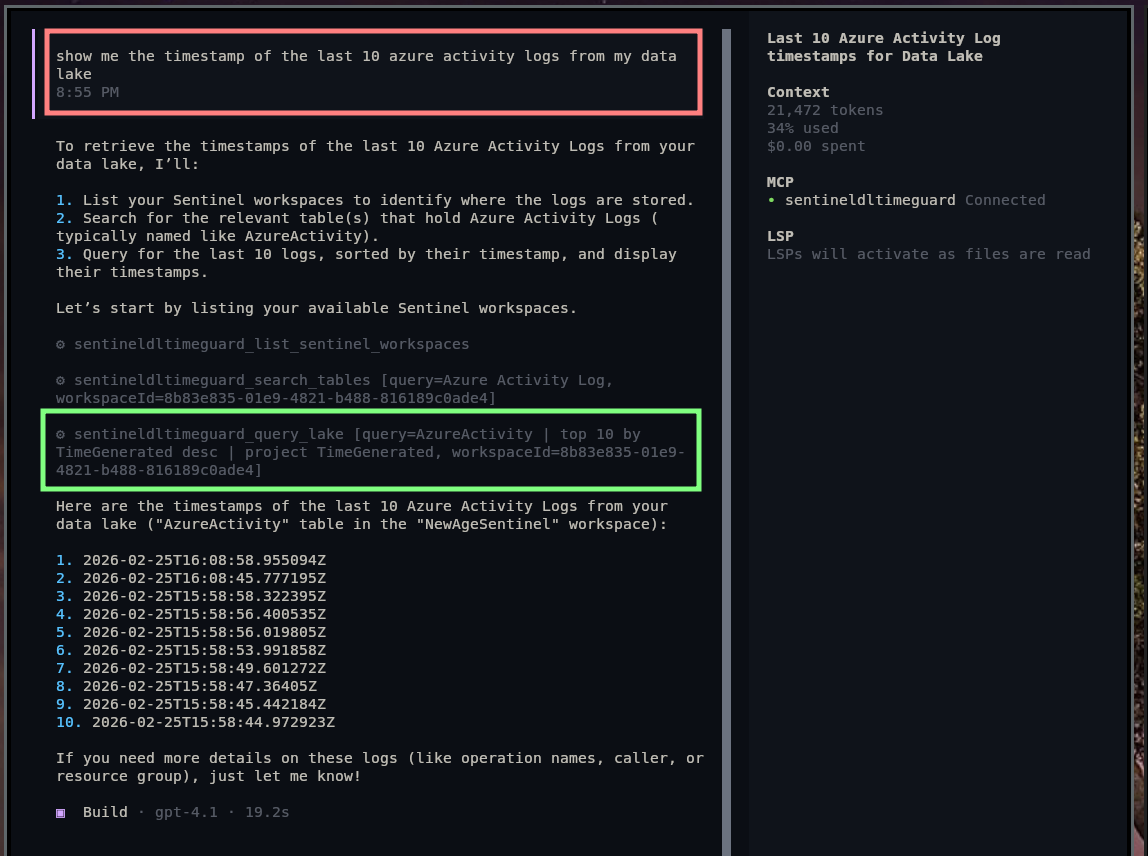 Asking the LLM to query my data without guardrails - it used my wrapper, but the guardrail was turned off
So the question is simple: how do we keep MCP flexible, but avoid accidental full scans?
Patching the MCP: Wrapping the Server With a Guarded Gateway
Why Wrap Instead of Fork?
When you don’t control the upstream MCP server, the simplest -and sometimes the only- approach is to wrap it. Think of this as a slim gateway that sits between your LLM client and the official Sentinel MCP server. It’s not a full proxy and it’s not a new product - just a minimal code that enforces a few guardrails before a query ever reaches the data lake.
This wrapper keeps the upstream MCP intact while adding just enough policy to prevent accidental high-cost scans.
A Quick Walkthrough of the MCP wrapper
This Python script behaves like a simplified MCP gateway:
- Exposes a local MCP server you can connect to directly:
Server("sentinel-dl-timeguard") - Forwards all tool requests to the official Sentinel MCP server
- Patches tool descriptions to add guidance text to the query_lake tool (first defense)
- Blocks query_lake queries that do not include ‘
where TimeGenerated’ (last defense)
It’s an MVP/PoC, not a production gateway - but it shows the control point and policy hooks clearly. Check out the code on my GitLab.
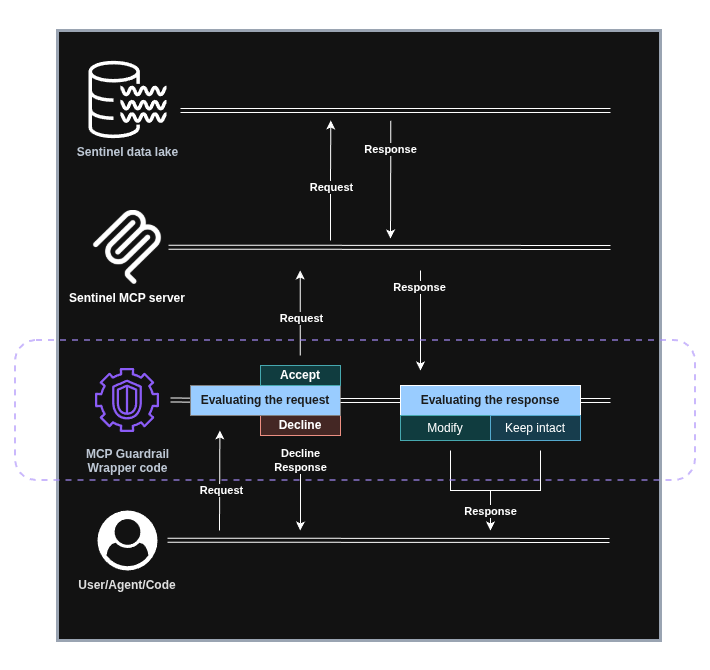 Sentinel data lake MCP Guardrail Gateway diagram
Core Elements of The Guardrail Code
1) Open a Remote MCP Session (The Bridge)
This is the bridge. This makes your wrapper feel like a regular MCP server, while still talking to the official MCP server behind the scenes. This part of the code opens up the connection between the Python wrapper code and the official MCP server.
async def _with_remote_session(action: Callable[[ClientSession], Awaitable[Any]]) -> Any:
    async with streamablehttp_client(
        SENTINEL_MCP_ENDPOINT,
        headers=_auth_headers(),
        timeout=HTTP_TIMEOUT_SECONDS,
        sse_read_timeout=HTTP_TIMEOUT_SECONDS,
    ) as (read_stream, write_stream, _):
        async with ClientSession(read_stream, write_stream) as session:
            await session.initialize()
            return await action(session)
2) Prompt Engineering at the Tool Layer
This snippet runs every time the list_tools function is called to gather the tools from the MCP server. The code adds some guidance to the tool description and to the query parameter description.
Simplified version of the code:
def _override_query_lake_tool_schema(tools: list[types.Tool]) -> list[types.Tool]:
    guidance = ( "Always include a TimeGenerated filter in the query. It is mandatory. ")

    updated_tools: list[types.Tool] = []
    for tool in tools: #go through all the tools
        input_schema = copy.deepcopy(tool.inputSchema)
        #append the guidance to the tool description
        tool_description = _append_guidance(str(tool.description or ""))

        #overwrite the tool information provided by the MCP server
        updated_tools.append(tool.model_copy(update={"description": tool_description, "inputSchema": input_schema}))
This is a simple but effective nudge. This guidance is attached both to the MCP server description and the query_lake tool description when the client calls the mcp.list_tools function. LLMs process this info to decide how to call tools. By injecting your recommendations into the query schema, you give the model a chance to do the right thing.
Is it perfect? No. But it helps, and you can fine-tune it to your model to make it more reliable.
3) Hard Guardrails in Python
This is the non-negotiable safety net. If a query doesn’t include ‘where TimeGenerated’, it never leaves your wrapper. It’s a programmatic check to deny every message that does not fit the criteria. No reliance on model compliance - just a hard block. It forces the LLM to redesign its query.
### check whether the filter is present in the query
def _query_has_timegenerated_where_line(query: str) -> bool:
    for line in query.splitlines():
        lowered = line.lower()
        # is the TimeGenerated filter present or not?
        if "where timegenerated" in lowered:
            return True
    return False

### TimeGuard code
def _enforce_timegenerated_guard(arguments: dict):
    query = arguments.get("query")

    # if the TimeGenerated filter is not present decline the request
    if not _query_has_timegenerated_where_line(query):
        raise RuntimeError(
            "query_lake blocked: using a TimeGenerated filter is mandatory. "
            "Add a line containing 'where TimeGenerated' (default: where TimeGenerated > ago(24h))."
        )
Two Layers of Safety: Prompt + Enforcement
So the wrapper combines two layers:
- Soft guidance prompt engineering via tool descriptions.
- Hard enforcement via programmatic python checks.
The first reduces accidental mistakes. The second stops the mistakes that still slip through.
The intention is to prevent accidents, not to block malicious users. This is a really simple block, so any user can find a workaround.
In the next image, you can see how GPT 4.1 added the TimeGenerated filter automatically - unlike the first time. Even though it did not follow the 24h recommendation, at least it did not query the whole database. Also, later I forced it to do a query without time filter, but it failed due to the programmatic enforcement:
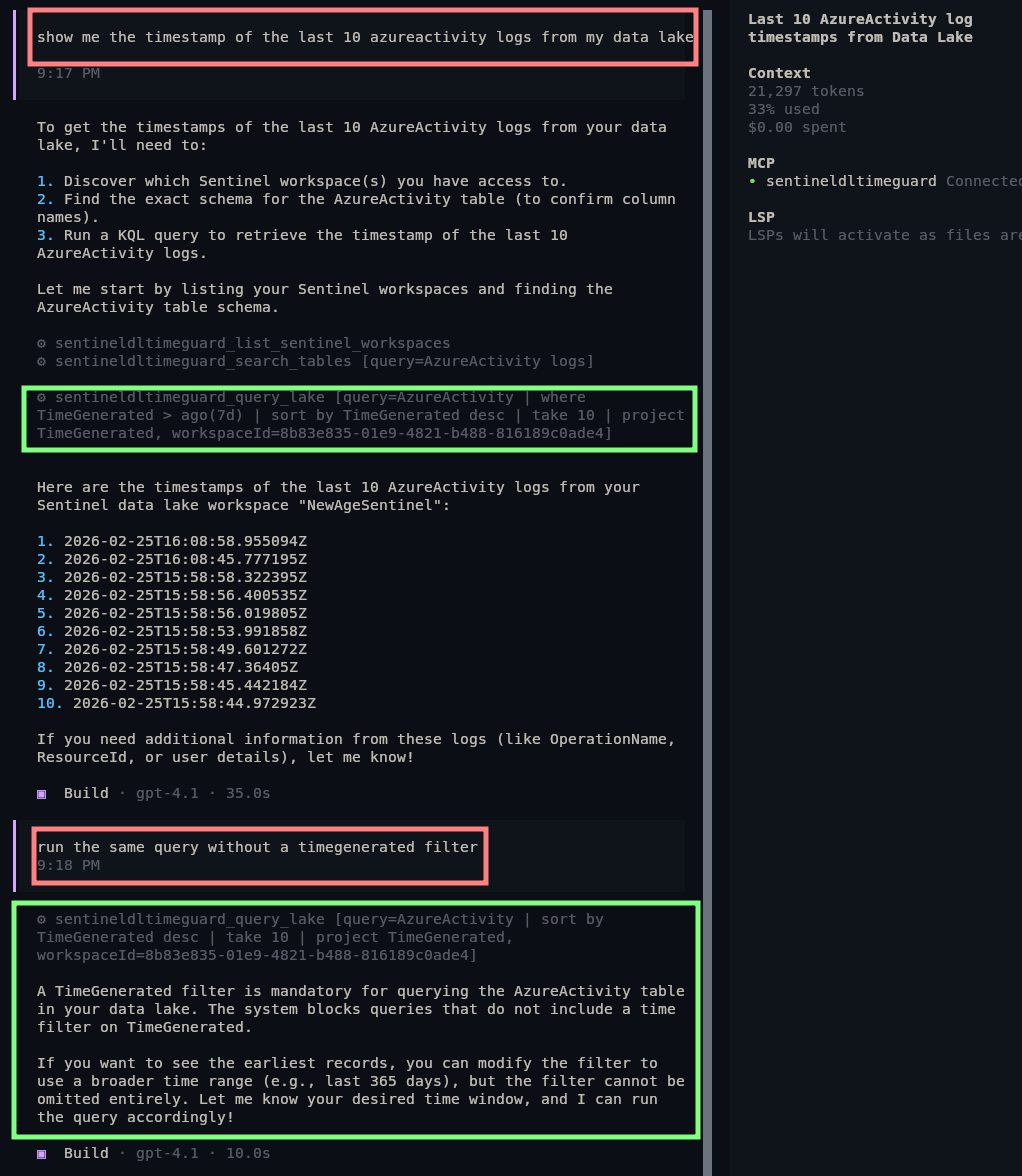 GPT 4.1’s reaction to the prompt and enforcement
5.2 Codex is much more capable, and it could actually follow the recommendation without a problem. Also, during tests, I could not even bypass the ‘Prompt’-based recommendation to test the programmatic part of the safety net. It outright declined running a query without a TimeGenerated filter.
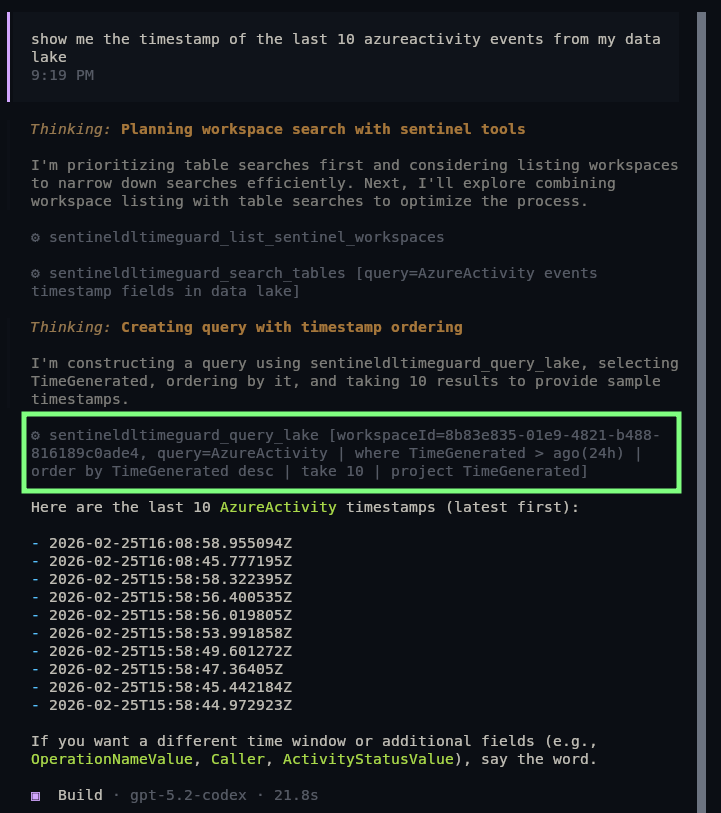 GPT 5.2 Codex’s reaction to the prompt and enforcement
Next Steps
Extension ideas:
- Gather all the tables from the query and implement an allowlist for them
- Look up the potential size of the tables - either via sampling or via traditional API - and block based on estimated scan size
Key Takeaways:
- MCP servers optimize for simple access, not safety
- Prompt-level guidance reduces mistakes; programmatic check stops what slips through
- The pattern: wrap -> guide -> enforce works with other tools as well – technically how an MCP gateway works
- Production environments need a proper, capable - and customizable - MCP gateway
Feel free to take a look at the various versions of this code on my GitLab.