
Who Read What?
SOC analysts run hundreds of KQL queries against Microsoft Sentinel every day, and the data they read is anything but harmless: passwords leaked into command lines, email subjects, sometimes card numbers in custom tables.
With an external SOC - or an AI agent querying your workspace - this matters even more. Did they touch sensitive data by accident, or go looking for it? Trust is not the same as verification.
In my previous post, I covered hiding tables with Protected Tables. But a SOC needs most of the data to do its job, so the real questions are: what were they looking for - and what did they actually get?
This post is a short proof of concept: using decision models (System One models) to judge whether a query targeted or exposed sensitive data.
Decision Models
In Sentinel, the LAQueryLogs table stores every query run against the workspace: who ran it, the full query text, the client app. What it doesn’t tell you is whether any of those queries touched sensitive data. The idea: pick up each executed query and pass it to a decision model to audit - and, optionally, re-run the query and evaluate the results as well.
Asking an LLM to review every query would be slow and expensive. Decision models - unlike regular LLMs - don’t generate text. You send a ‘state’ (the content to judge) and typed questions: yes/no, multiple choice, or a position on a scale. What comes back is a probability, not an explanation - just a number your code can act on. For auditing thousands of queries, that’s exactly what we need.
A simple example of using a decision model:
- State: An executed KQL query and its output columns, plus what counts as sensitive (credentials, personal data, financial, health, private content):
SecurityEvent | where CommandLine has "password" | project Account, CommandLine - Question (yes/no): Is this query targeting sensitive data?
- Answer:
0.89- the model is fairly confident the query is actively looking for sensitive data.
Why they fit this problem:
- Classification, not conversation: ‘Is this query targeting sensitive data?’ is a narrow question with a yes/no answer - no prose needed.
- Probabilities you can act on: You decide where ‘yes’ starts and ’no’ ends, and what goes to a human or an LLM in between.
- Cheap and fast: Input tokens are cheap, output tokens are free, and calls took 0.3-0.6 seconds in my tests. Auditing 10,000 queries, two calls each, costs less than a dollar (with some models).
- Small enough to run locally: Many decision models are small, so you can host them yourself - the queries and their results never have to leave your environment.
My tests, however, used publicly hosted models, which was fine with my synthetic data - the results below come from those.
1. The State
I won’t share the full prompt here, but these are the pieces of context I put in the state. Testing showed each one steered the models toward better answers:
- Purpose: The audit is about whether the actor who ran the query may have accessed sensitive data - not whether the query is malicious. Without this, models judge whether the query looks suspicious and flag harmless hunting queries.
- Sensitive categories: Credentials, personal data, financial, health, and private content (human-written text such as email and ticket bodies, chat messages and LLM prompts). A short, explicit list gives the model a fixed definition instead of its own idea of ‘sensitive’.
- Harmless categories: Aggregates, operational telemetry, metadata (schemas, secret names - not their values) and masked values (’****1111’, ‘[REDACTED]’). Telling the model what isn’t sensitive matters as much as what is - it cuts many false alarms.
- Free text: Command lines, log messages and JSON payloads can hide sensitive data, even when no column name says so. This is what catches the accidental cases - like a password in an error message.
- Column context: A
card_idin a poker or dashboard table is harmless, and so is atokencolumn holding LLM token counts - but acard_idin a payments table could be a card number. The model has to infer from the table and the other columns, not from the name alone.
These lists are tuned for my test data. For real use, extend them with your own custom tables and what your organization treats as sensitive.
2. The Questions
Like the state, the questions can make or break the tool. I asked four questions, split across two calls.
Call 1 - Query only: The state holds the executed query from LAQueryLogs and its output columns (I also tested without the columns). All three questions go in the same request, so you pay for the state only once.
- Could it expose sensitive data? (yes/no) Does the output contain sensitive columns, or free text that might hold sensitive data?
- Is it targeting sensitive data? (yes/no) Does it search for secrets, extract or decode values, select SSNs or card numbers? A broad listing or a troubleshooting query is not targeting.
- Category: (multiple choice) Which sensitive or harmless category it fits. I used this only as metadata - to tag and filter flagged queries - so it is not scored in the results below.
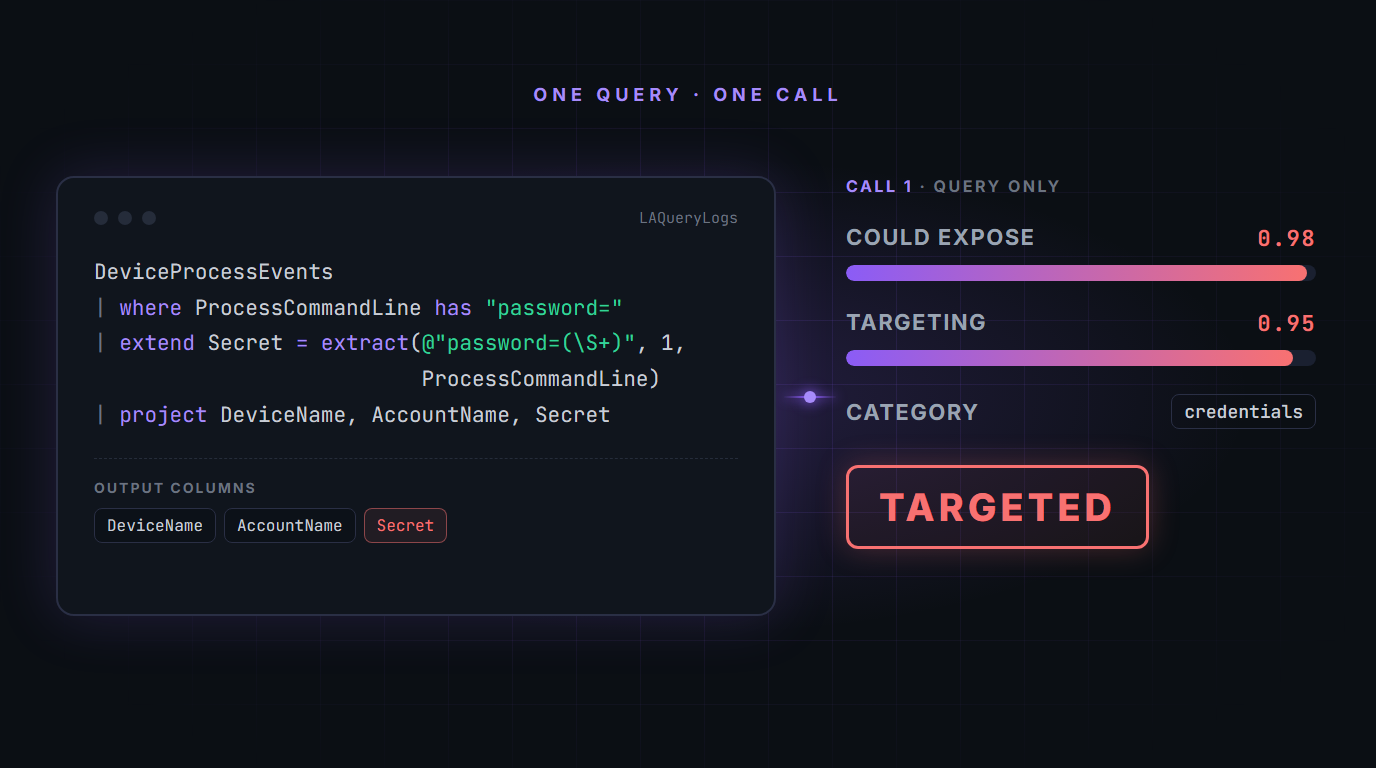 ‘Targeted’ means the user or agent was actively looking for sensitive data. The image shows the first call only.
Call 2 - Query + results: The fourth question needs the query results, but when the model saw them, they bled into its judgment of the query itself - an innocent error-log query that happened to return a password suddenly looked ‘deliberate’. The first three questions were answered more accurately without the results, so the fourth got its own call.
- Did sensitive data come back? (yes/no) Judged on the values, not the column names.
Each query ends up with an outcome built from these answers:
- From call 1: ’targeted’, ‘could expose’ or ‘harmless’
- From call 2 (only if the query returned data): ‘confirmed’ or ’not confirmed’
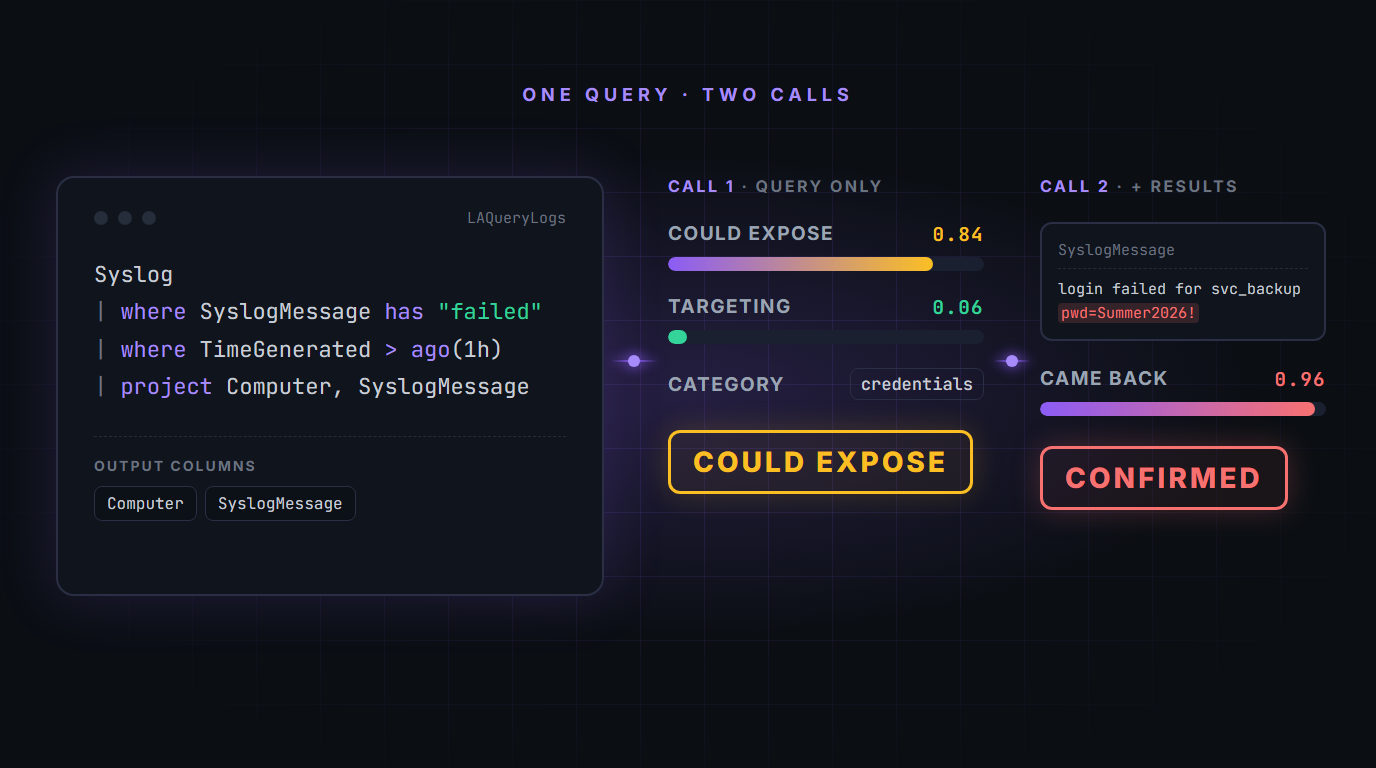 Not targeted - but a password came back. ‘Could expose’ means the query returns broad results that might contain more than the user was looking for. Based on the query the model even assumed it might expose some ‘credentials’. Them the second call confirmed the sensitive data. The image shows the first and second calls together.
The Test
My test set had 70 queries, mixing built-in tables with custom tables full of fake card numbers and secrets, plus tricky cases like masked data, renamed columns and dynamically generated sensitive information (e.g., Base64 encoding in the query to hide info in the output).
Decision models return a probability between 0 and 1, not a plain yes or no. Instead of using a single cutoff, I sorted the answers into bands: confident ’no’, uncertain, and confident ‘yes’. I picked the thresholds below for each question based on how the models behaved in my tests. Depending on the model and your use case, you may need to adjust them.
| Question | Meaning | Confident ’no’ | Uncertain | Confident ‘yes’ |
|---|---|---|---|---|
| Could expose | Could the output contain sensitive data? | ≤ 0.20 | between | ≥ 0.80 |
| Targeting | Was the user or agent deliberately looking for sensitive data? | ≤ 0.30 | between | ≥ 0.85 |
| Data came back | Did the results actually contain sensitive data? | < 0.50 | - | ≥ 0.50 |
The models were decisive on this question, so a single 0.5 cutoff was enough.
‘Uncertain’ is not a failure - it means the model couldn’t decide, and that’s the signal to hand the query to a reasoning LLM, your agent or a human.
Results
Below are the results for the six best models, from the runs that included the output columns. Without the columns, ‘Could expose’ accuracy was slightly worse, so I recommend adding them.
The chart gives the overall picture: how many answers each model was uncertain about (escalated to a reasoning LLM or a human) and how many it got confidently wrong, across all three questions.
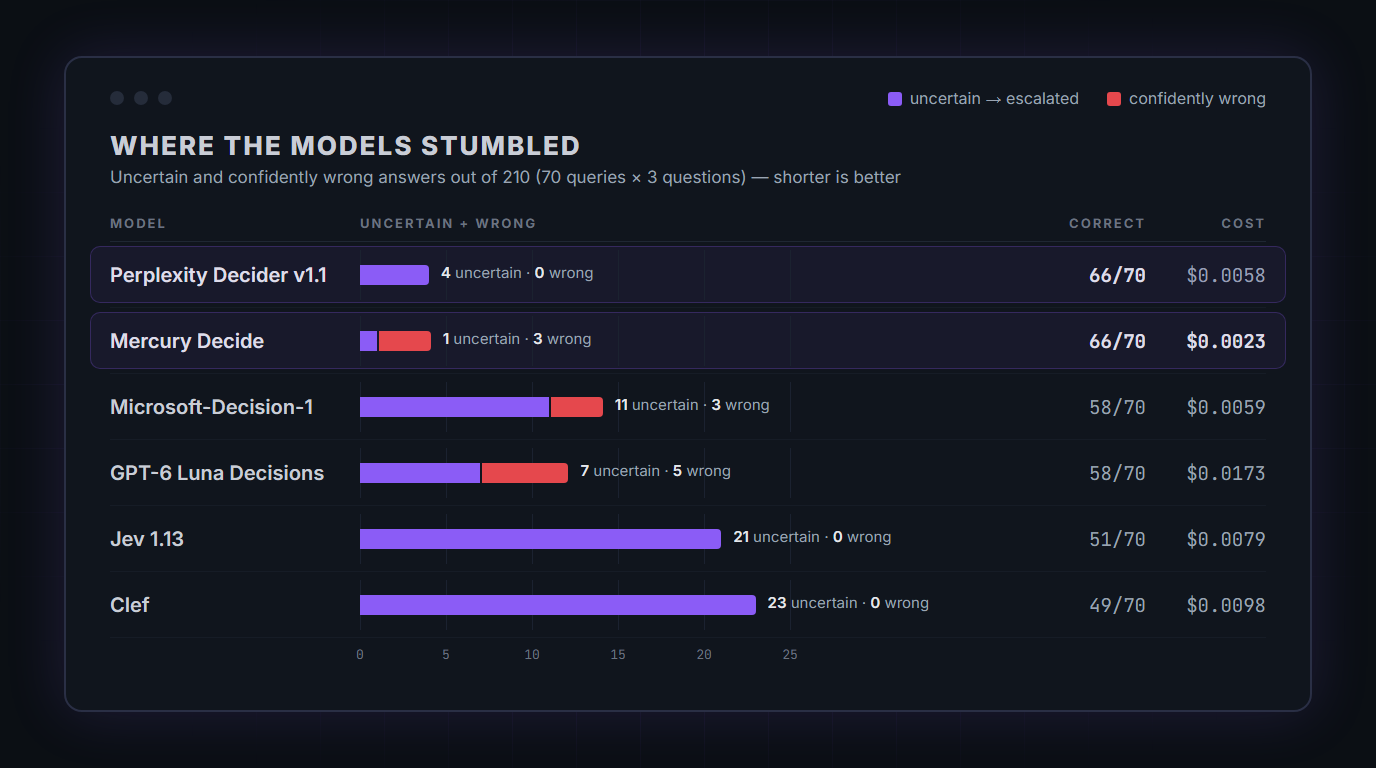 Uncertain and confidently wrong answers per model, across all three questions (210 answers in total).
The table below breaks this down per question. Each cell shows correct / uncertain / wrong out of 70 cases; ‘Data came back’ has no uncertain band, so it shows correct / wrong. ‘Outcome correct’ is the final label out of 70, and cost covers 140 calls (70 queries, two calls each).
| Model | Could expose | Targeting | Data came back | Outcome correct | Confidently wrong | Cost (140 calls) |
|---|---|---|---|---|---|---|
| Perplexity Decider v1.1 | 67 / 3 / 0 | 69 / 1 / 0 | 70 / 0 | 66 | 0 | $0.0058 |
| Mercury Decide | 69 / 1 / 0 | 67 / 0 / 3 | 70 / 0 | 66 | 3 | $0.0023 |
| Microsoft-Decision-1 | 67 / 3 / 0 | 61 / 8 / 1 | 68 / 2 | 58 | 3 | $0.0059 |
| GPT-6 Luna Decisions | 69 / 1 / 0 | 60 / 6 / 4 | 69 / 1 | 58 | 5 | $0.0173 |
| Jev 1.13 | 64 / 6 / 0 | 55 / 15 / 0 | 70 / 0 | 51 | 0 | $0.0079 |
| Clef | 58 / 12 / 0 | 59 / 11 / 0 | 70 / 0 | 49 | 0 | $0.0098 |
- Perplexity Decider: Never confidently wrong. Its four uncertain answers were genuinely hard cases - free text in columns whose names don’t reveal what’s inside.
- Mercury Decide: The cheapest, and joint best on ‘Could expose’ - but three confidently wrong answers, all on targeting.
- Microsoft-Decision-1 and GPT-6 Luna: Solid on ‘Could expose’, weaker on targeting. Luna cost about 3x Perplexity for fewer correct outcomes.
- Jev and Clef: Never confidently wrong either, but uncertain on 21 and 23 answers - each of which would go to a reasoning LLM, raising the overall cost.
Closing Thoughts
Decision models won’t replace a reasoning LLM, but they make a good first gate before you involve one. This is a monitoring and auditing setup, but thanks to the speed and low cost, you could also put it in a gateway in front of an agent:
- Block or hold the agent’s query if it is scored ’targeted’ (≥ 0.85).
- Withhold the response if it is scored ‘confirmed’ (data came back ≥ 0.50).
I already use decision models in other tools of mine - for example to confirm evidence in an AI SOC, or to detect semantic drift in data schemas. This KQL auditor is the one I’ve been experimenting with most recently - and if an MSSP or AI agents query your workspace, it’s a cheap way to keep track of what sensitive data they actually touch.
If you have any feedback or questions, feel free to reach out.