On 23 September 2026, Microsoft changed how new customers get the Microsoft Sentinel data lake experience. Most posts since then focus on the simpler onboarding, but the update also changes which features you get and how the APIs behave. The documentation does not cover all of it, so I tested it in my own tenants.
In short: for new customers, the data lake is no longer a platform. It is a table tier, much like Auxiliary was before. The old lake came with its own exploration page, advanced analytics capabilities, API and MCP server. The new one is a setting you pick per table in Table management. Almost everything below comes from this one shift.
If you have read earlier posts about the Sentinel data lake (including mine), read this one too - your setup may work differently depending on when you onboarded.
What Microsoft announced
The update is short. For customers onboarding after 23 September 2026, Microsoft says:
- Built-in setup: data lake comes with Sentinel, with no separate onboarding required. To enable it, configure a table to use it in Table management.
- Interactive queries: lake data is queryable in Advanced Hunting.
- Mirroring to Fabric: you can mirror your tables to Microsoft Fabric.
- Advanced analytics: advanced features move to Fabric.
Customers who enabled the data lake before 23 September keep their existing setup. Those who had not enabled it by then automatically get the built-in option.
These points sound simple, but they have consequences that are easy to miss.
1. Built-in setup
“Going forward, you do not need to go through a separate data lake onboarding and billing setup.”
Access used to be the hard part: many of us waited for capacity. Now you onboard Sentinel, connect it to the Defender portal, and the lake is ready to use. No separate data lake enablement step is needed anymore.
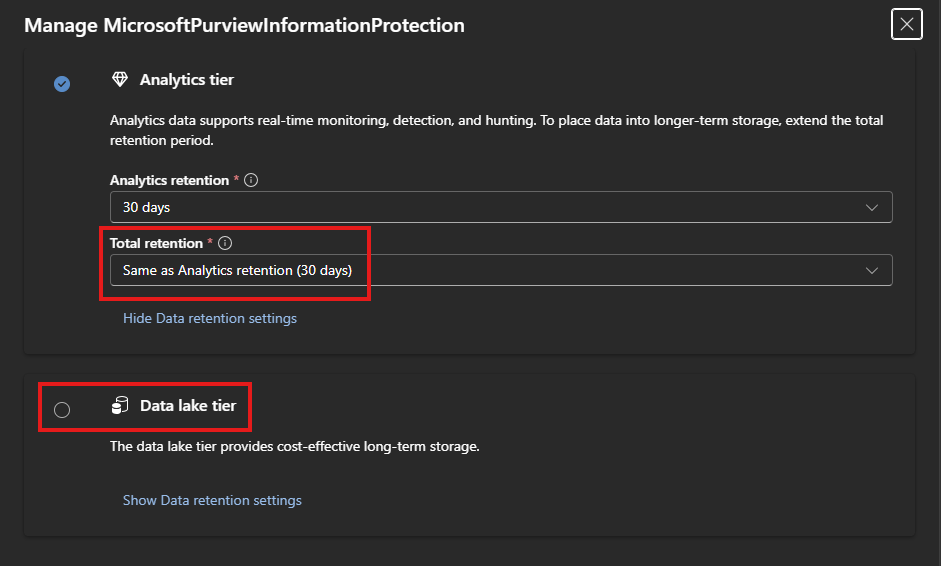 There is no longer a separate enablement step. Just configure your table to use data lake as its tier or for archived data.
What you lose
New customers get the lake as a storage tier, not as a platform. So, the capabilities previously available under the Data lake exploration section are missing from the new experience:
- No Data lake exploration. Interactive KQL moves to Advanced Hunting, with limits (section 2).
- No KQL jobs. The closest built-in option is summary rules, which are more limited; beyond that, Fabric.
- No notebooks. Fabric only - the use cases I wrote about earlier have to be rebuilt there.
- No built-in split. The split feature, which divides a table’s data between the analytics tier and a related data lake table, checks whether the legacy data lake is enabled, so it is not available with the new lake. You can still get the same result manually: create a copy of the table and change the DCR to send the data you don’t need in Analytics there.
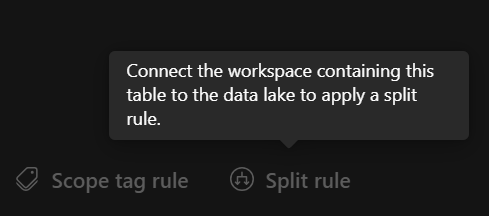
- No data lake API and no MCP server. The Sentinel MCP server requires the Sentinel data lake; in my tests both the MCP server and the data lake API returned
TenantNotFoundon tenants onboarded after 23 September. So the gateway I built in front of that MCP server has nothing to talk to in a new tenant.
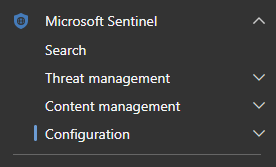 Data lake exploration does not exist anymore.
What you gain
This built-in setup is not all subtraction:
- Access for everyone. No separate onboarding, no capacity queue. For a lot of tenants the lake was simply out of reach; now it is one setting on a table.
- Multi-region. The old lake took the region of the primary workspace when you enabled it, and that was final: no workspace from another region could be connected to it. Now, you can use it on any workspace regardless of its region. For anyone with workspaces spread across geographies - MSSPs, multinationals, companies with residency requirements - this is the biggest win in the update.
- Advanced Hunting, properly. Lake tables now behave like every other table in Advanced Hunting. They appear in the schema, support autocomplete, and can be easily queried alongside Defender XDR data.
2. Interactive queries
“You can query data in the data lake directly by using Advanced Hunting (…) without first restoring it to the Analytics tier.”
Microsoft presents querying lake data in Advanced Hunting as the new way. Strictly speaking, it was always possible, but you queried blind: previously lake tables did not appear in the schema, so no syntax checks, no autocomplete. Now they show up next to your Defender XDR data with full capabilities - a better experience.
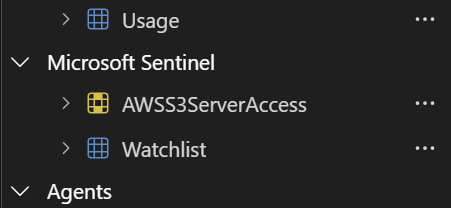 Data lake table schema in Advanced Hunting.
‘Archived data’: in this article, archived data means the data an Analytics-tier table keeps after its Analytics retention ends, up to its Total retention period.
Which data lake events you can query depends on the table’s configuration:
- Set to the Data lake tier: Advanced Hunting reads the lake, and all of the table’s data is queryable.
- Set to Analytics tier: it reads only the analytics data. Data kept beyond the Analytics retention period (extended retention in the lake), and anything ingested while the table was set to the data lake tier, cannot be queried interactively. Microsoft lists the extended-retention part as a known issue (interestingly, an issue rather than a by-design limitation) and points you to Search jobs. So if you keep data for 90 days in the Analytics tier and set total retention to 120 days, the oldest 30 days (days 91–120), which only live in the lake, won’t be queryable from Advanced Hunting.
Officially moving data lake queries to the Advanced Hunting page seems like a negligible win compared to the cost:
- Having everything in one place is convenient, but query costs may limit how often SOC and Threat Hunt teams actually use the lake.
- But the documented loss of interactivity that comes with it is a huge step back: the old Data lake exploration page could query the whole lake, so a short Analytics retention plus a long lake retention still gave interactive access to both. The data retained beyond that Analytics retention period now behaves like cold storage. If you need older logs interactively, for compliance for example, you have to keep them in Analytics longer and pay for it.
3. Mirroring to Fabric
“The mirroring feature doesn’t create a copy of the data and incurs no additional charge.”
Mirroring is the bridge to Microsoft Fabric: you pick the Sentinel tables you want and they show up there. Nothing is copied - Fabric reads the data where it already lives, in your Sentinel workspace.
It is also the entry point for everything advanced. Jobs and notebooks used to sit in the Defender portal; now they live in a second platform:
- Fabric capacity. Mirroring is free, but Fabric runs on its own paid capacity.
- Fabric knowledge. Fabric requires a different set of skills and familiarity with a new tool.
- Extra permissions. Fabric requires a new permission setup, because Sentinel permissions don’t carry over.
- Internal process. A new platform usually means budget approval and a security review - a full intake can take a long time.
For a small team this is a real pain; companies already running Fabric will feel it less.
What I saw vs. what Microsoft documented
Mirroring is not limited to data lake tables. Microsoft’s announcement talks about mirroring the data lake tier. But as a clarification, any Sentinel table can be mirrored. The table type itself does not have to be ‘data lake’.
Historical data was there. The mirroring tutorial says “Only new data is mirrored. Data that arrived before the table was mirrored isn’t backfilled into Fabric during public preview.” In my test I turned mirroring on two days after enabling the lake, and Fabric still showed those earlier days. Since Fabric reads data in place, as Microsoft describes, I would expect older data to be accessible too. That matched my results, but it differs from the documented behavior. My test was small (a few GB over two days) and the feature is in preview, so treat this as an observation, not a guarantee.
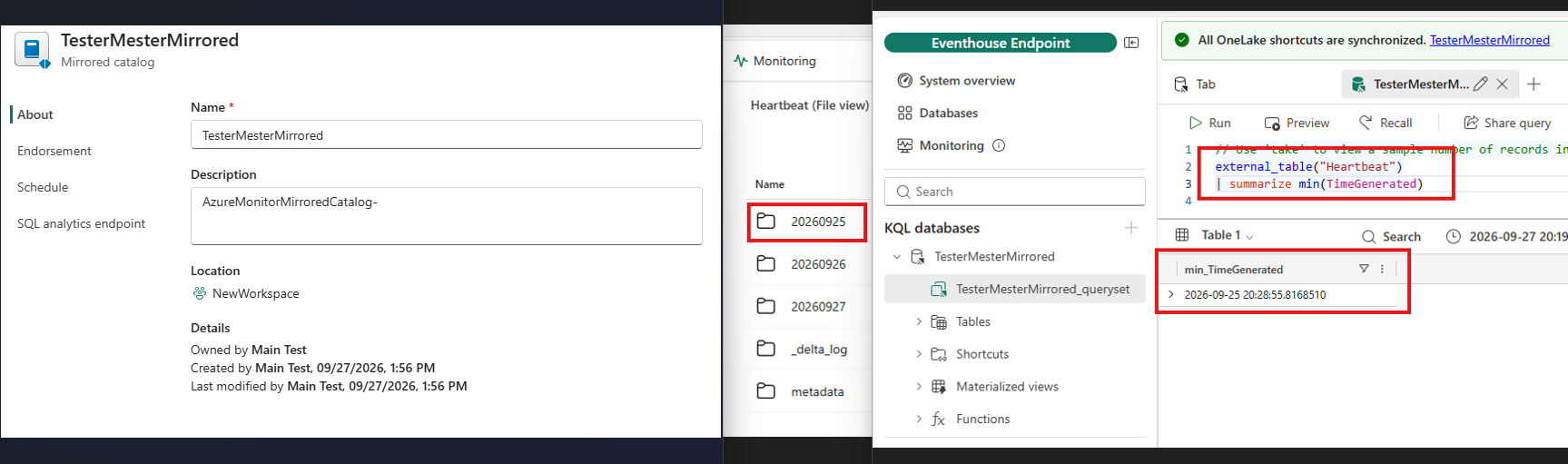 The image shows that mirroring was enabled on the 27th of Sept. while it also shows data that was ingested into Sentinel on the 25th.
4. Advanced analytics in Fabric
“Microsoft Fabric enables custom analytics across data lake tables and external data tables.”
Once mirrored, Fabric takes over what the old lake features did and adds much more: scheduled jobs, notebooks, graph capabilities. For the features teams relied on, you now have two options - a limited alternative when available (e.g. summary rules instead of KQL jobs), or Fabric.
The good part 🙂
For a long time I have argued that a SIEM needs real data analytics - most lack it, which is why security data pipelines became such a big deal (I went through that architecture in an earlier post). The old data lake was a first, limited step; Fabric is a full data platform: combine security data with other sources, build real pipelines, run analytics at a scale that was not possible before.
The not so good part 🙁
The real question is who builds and runs it. Until now the SOC owned everything: data, queries, detections and, with the old lake, jobs and notebooks. Fabric is a data platform first, and where it exists, it usually has an owner outside the SOC/SIEM engineering function:
- Two skill sets. Many smaller companies cannot afford to hire or train for both Sentinel and Fabric.
- Two teams. Where a data team owns Fabric, every new job becomes a request to someone else.
- Unclear ownership. Who is responsible when a Fabric pipeline breaks and a detection silently stops receiving data? This is already a difficult problem.
- More moving parts. Data goes from Sentinel to Fabric and back again for detections; every step has to be set up, secured and monitored.
The capabilities are much better. Whether you can use them depends less on the technology and more on your organisation.
Old and new side by side
| Onboarded before 23 September | Onboarded after | |
|---|---|---|
| Onboarding | Separate, capacity-gated | Built-in, available |
| Data lake exploration | Interactive KQL on the whole lake | Gone |
| Advanced Hunting | Limited experience (no autocomplete, no schema) Limited access to ‘archived data’ |
Full experience Limited access to ‘archived data’ |
| Archived data access | Interactive - from DL exploration | Cold storage - Search jobs |
| KQL jobs | Yes | Summary rules, or Fabric |
| Notebooks | In the Defender portal + Sentinel extension | Fabric only |
| Data Split | Built-in | Manual - table copy + DCR change |
| Data lake API and MCP server | Yes | No |
| Multi-region | No | Yes |
Closing thoughts
The Sentinel data lake is easier to get now, but with trade-offs everybody should know about - and it is not a choice: which version you get depends only on when you onboarded.
Checking which one you have is simple: if the Data lake exploration page is still there in the Defender portal, you are on the old model; if it is gone, you are on the new one. There is no way to move between them either, and Microsoft has not said anything about whether a migration is coming.
And that is not the only open question. Does anything change in pricing? Do the features that worked - or did not work - with the legacy lake behave the same way here? There is a lot left to test on my side, and a lot left for Microsoft to publish.